
Talkatone: Texting & Calling
Talkatone, LlcCommunication
3.461.18K Reviews
- Version
- 10.6.2
- Installs
- 10.00M
- Age Rating
- Everyone
Screenshots
Our Review of Talkatone: Texting & Calling
 Analysis by Appyee
I’d treat Talkatone as a second line rather than a magic replacement for a mobile plan. It’s a communication app from Talkatone, Llc, and its appeal is straightforward: it gives you another way to call and text when Wi-Fi is available. I can see the value for travel, a spare device, or keeping personal conversations separate, but the setup and connection deserve a little thought before you rely on it for something important.
Getting Talkatone to work smoothly
I use this section to focus on the small checks that make a second line easier to manage: test it on the connection you expect to use, then keep its number and inbox tied to a clear purpose. That routine helps separate a temporary network hiccup from a broader problem and makes it less likely that an important reply gets lost among everyday conversations.
Where setup and first calls can snag
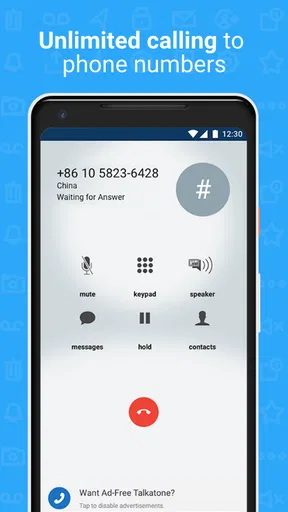
The first hurdle is less about complicated menus and more about understanding what kind of service you’re using. Talkatone depends on an internet connection, so a call that sounds fine at home may become choppy on a crowded public network. I’d make a quick test call and send a test message before sharing the number or counting on it for a time-sensitive conversation.
That small test also helps you learn where the call and message controls are. The interface is fairly easy to follow, but any second-number app adds one more inbox and call history to keep track of. If you already juggle work and personal conversations, decide which number you’ll give to whom before you start using it widely. That simple boundary can prevent missed replies and awkward confusion later.
The app is free to install, and its Everyone age rating makes it broadly accessible. Talkatone has a 3.7 average from around 195,000 ratings, so I’d approach it as a useful option to try rather than assume every person’s experience will be identical. It has more than 10 million installs, which shows that the second-line idea has a wide audience, but your own connection and calling needs matter more than popularity.
Check the connection before blaming the app
Because calls travel over Wi-Fi or mobile data, network quality is part of the experience. If audio cuts out, I’d first try a different connection and see whether other internet-based services are also struggling. On public Wi-Fi, a weak signal or a busy network can affect the call even when ordinary browsing seems passable. Moving closer to the router or switching to a more stable connection is a sensible first check.
For a message that seems delayed, I’d confirm the device is online, reopen the conversation, and give the connection a moment before sending the same text repeatedly. Duplicate messages are easy to create when you’re unsure whether the first attempt went through. If the issue persists, restarting the app and then checking for an available update are practical next steps; the current version is 10.0.0, and it runs on Android 6.0 or later.
It’s also worth distinguishing an internet call from ordinary cellular calling. Talkatone can be handy where Wi-Fi is available, but it is not a dependable substitute for a working connection. If you’re heading somewhere with patchy coverage, arrange a backup way to reach the person you’re meeting instead of assuming the app will bridge the gap.
A second number works best with a clear routine
I’d use Talkatone for a specific purpose instead of handing out its number everywhere at once. For example, a student could use it for calls about a short-term project, while a traveler could keep it for contacts they expect to reach over Wi-Fi. A dedicated purpose makes it easier to notice important messages and decide when to check the app.
Picture a day of travel: you arrive at a hotel, connect to Wi-Fi, and need to tell a friend that your plans have changed. A second-line app can be useful in that moment, especially if you want to avoid relying on a standard phone call. I’d still send a brief test message first, then confirm that the other person has received it before making the app the only way to coordinate.
For group plans, group texting can keep the conversation in one place, but it can also create a busy thread where important details disappear among replies. I find it helpful to put the key time and meeting place in a clear message near the end of the discussion. That’s not a special feature; it’s simply a better way to use a group conversation when several people are coordinating.
Useful extras, with trade-offs
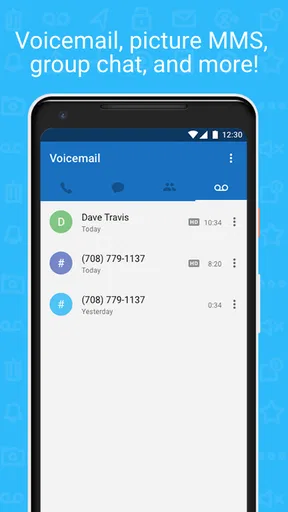
Talkatone includes voicemail, call forwarding, number blocking, and picture messaging. Those options make it more flexible than a bare calling screen: voicemail can catch a missed call, while blocking can help when an unwanted number keeps appearing. Picture messages are convenient when you’re on Wi-Fi, though I wouldn’t assume every recipient’s device or connection will handle a message in exactly the same way.
The ability to change your number may help if you want to stop using an old contact point, but it’s not a step I’d take casually. Before changing numbers, think about who still needs to reach you through the old one and update the people or services that matter. A number is only useful if the right contacts know where to find you.
Talkatone is free, but the app includes ads and offers in-app purchases priced from $0.99 to $14.99 per item. I’d try the basic experience before spending money, then decide whether any paid option solves a real annoyance for you. The app’s low-cost appeal is strongest when the free version already covers your needs; paying without first identifying a specific benefit makes less sense.
When another communication option is better
Compared with a regular carrier line, Talkatone’s main trade-off is its reliance on internet access. A standard mobile service is the safer choice when you need dependable calling away from Wi-Fi or want one number to serve as your primary contact. If your current plan already gives you enough calls and texts, a second-line app may add more inbox management than value.
It also differs from messaging apps that work best when both people use the same service. Talkatone’s phone-number approach can be useful when you want to reach someone through calls or texts rather than persuade them to join another chat platform. On the other hand, if your friends and family already coordinate in one messaging app, staying there may be simpler and keep conversations together.
I’d skip Talkatone as my only contact method for emergencies, important work calls, or travel plans in places where internet access is uncertain. It’s better suited to flexible, non-urgent communication and as a backup line. Keep another way to contact people if losing the connection would leave you stranded.
My practical verdict
Talkatone is worth considering if you want an additional number and are comfortable making calls and sending texts through an internet connection. Its voicemail, forwarding, group messaging, picture sharing, and blocking tools give it practical uses beyond a one-off call. The key is to test it in the places you expect to use it and make sure the people you care about know which number to contact.
As a communication app, it fills a specific gap rather than replacing every phone service. I’d recommend it to someone who wants a low-cost secondary line for casual conversations, travel with reliable Wi-Fi, or keeping certain contacts separate. If you need consistent coverage everywhere, or prefer not to manage another number and inbox, your usual carrier service or established messaging app is likely the better fit.
So, I recently stumbled upon Talkatone: Texting & Calling while hunting for an app that could help me stay connected without eating into my phone plan. Let me tell you, it’s been an interesting ride. If you’re like me and always looking for ways to cut down on costs while keeping the lines of communication open, you might want to give this app a whirl.
What’s the Deal with Talkatone?
Okay, so here’s the scoop. Talkatone is this nifty app that lets you make free calls and send texts over Wi-Fi or data. Perfect for those times when you’re traveling or just want to save some bucks. It’s available on both Android and iOS, making it super accessible.
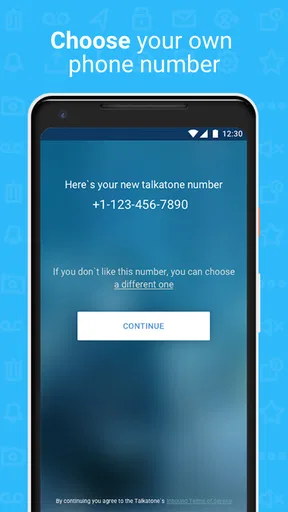
The app gives you a free U.S. phone number which you can use to call and text anyone in the States. If you're calling internationally, there’s a small fee, but hey, it’s still pretty cost-effective compared to the usual rates. You can also receive calls and texts from anyone, which is a lifesaver for those of us who don’t want to be tied down to one device.
Easy Peasy Setup
Getting started with Talkatone is a breeze. Once you download the app, you just need to sign up with your email or through Facebook. After that, you’re good to go. The interface is straightforward, which is great because nobody has time to fiddle around with complicated setups, right?
The app layout is pretty intuitive. You’ve got your usual tabs for calls and messages, and there’s even a section for voicemails, which is a nice touch. I found the call quality to be decent, though it can be a bit hit-or-miss depending on your Wi-Fi connection. But hey, it’s free, so I’m not complaining.
Features Galore
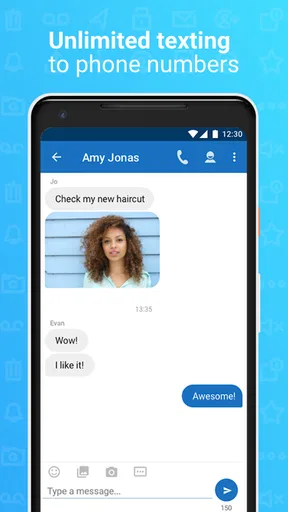
One of the standout features of Talkatone is the ability to send pictures over Wi-Fi. Seriously, it’s a game-changer when you're trying to share those priceless moments without worrying about data charges.
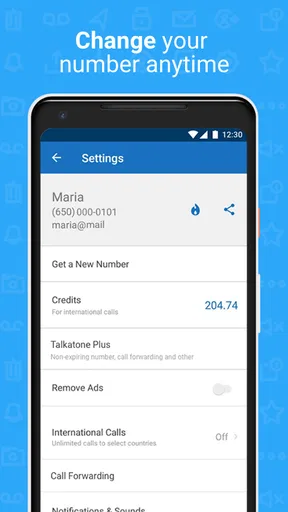
Another cool feature is the ability to change your phone number if you need to. Whether you’re dodging telemarketers or just need a fresh start, this can be super handy. Plus, they offer call forwarding and voicemail, which are always nice to have.
The app also supports group texting, which is perfect for planning that surprise party or just keeping up with the fam. And if you’re looking for a bit of privacy, Talkatone allows you to block numbers, which is a relief for those of us who’ve had enough of spam calls.
Staying Connected on a Budget
Let’s be real. Not all of us have the luxury of unlimited call and text plans. That’s where Talkatone shines. It’s a solid option for students, travelers, or anyone looking to cut down on their mobile expenses. The ability to call and text over Wi-Fi means you can stay connected without fretting over your phone bill.
However, it’s worth noting that the app does come with ads. They’re not too intrusive, but if you want an ad-free experience, there’s an option to upgrade. Considering the app is free, the ads are a small price to pay, in my opinion.
Final Thoughts
In a world where communication is key, having an app like Talkatone can be a real lifesaver. It’s simple, effective, and best of all, it won’t break the bank. While it may not replace your primary phone service, it’s definitely a great backup or supplementary option.
So, if you’re on the lookout for a reliable way to stay in touch without shelling out the big bucks, give Talkatone: Texting & Calling a shot. It might just be the app you didn’t know you needed.
Privacy and Permissions
See what permissions an app requests and how it handles your data.
- Identity
- find accounts on the device, add or remove accounts
- Contacts
- find accounts on the device, read your contacts, modify your contacts
- Location
- approximate location (network-based), precise location (GPS and network-based)
- Phone
- read phone status and identity
- Photos/Media/Files
- read the contents of your USB storage, modify or delete the contents of your USB storage
- Storage
- read the contents of your USB storage, modify or delete the contents of your USB storage
- Camera
- take pictures and videos
- Microphone
- record audio
- Wi-Fi connection information
- view Wi-Fi connections
- Device ID & call information
- read phone status and identity
- Other
- view network connections, create accounts and set passwords, pair with Bluetooth devices, disable your screen lock, full network access, change your audio settings, read sync settings, use accounts on the device, control vibration, prevent device from sleeping, toggle sync on and off, Google Play license check
Verdict
Strengths of Talkatone: Texting & Calling
- Free calls to US/Canada numbers.
- No SIM card needed for usage.
- Simple, intuitive user interface.
- Reliable call quality over Wi-Fi.
- Supports text and picture messaging.
Limitations of Talkatone: Texting & Calling
- Ads can be intrusive at times.
- Limited international calling options.
- Requires a stable internet connection.
- No voicemail feature available.
- Limited customization options.
Similar Picks in This Category
View All
Google Messages
Google LLC4.6

Gmail
Google LLC4.1

Google Meet
Google LLC4.4

Google Chrome
Google LLC4.1

WhatsApp Messenger
WhatsApp LLC4.6

Carrier Services
Google LLC4.2
Frequently Asked Questions
What is Talkatone and how does it work?
Talkatone is a mobile app that allows users to make free calls and send texts over Wi-Fi or cellular data. It provides users with a free U.S. phone number, enabling them to communicate without the need for a traditional cellular plan. It's ideal for those looking to save on calling and texting costs.
Is Talkatone free to use?
Yes, Talkatone is free to download and use. It offers free calling and texting to U.S. phone numbers. However, international calls may incur charges. The app is supported through ads, but users can opt for an ad-free experience with a subscription. It's a great option for budget-conscious users.
Can I use Talkatone when traveling internationally?
Absolutely! Talkatone can be used anywhere with a Wi-Fi connection, making it a convenient choice for travelers who want to avoid roaming charges. Just remember that while calls to U.S. numbers are free, international calls may require purchasing credits. It's a handy tool for staying connected abroad.
How is the call quality on Talkatone?
The call quality on Talkatone largely depends on your internet connection. With a strong Wi-Fi or cellular data connection, users can expect clear and stable calls. However, in areas with weak connectivity, call quality might be affected. Overall, it competes well with traditional calling services when conditions are optimal.
Is my personal information safe with Talkatone?
Talkatone prioritizes user privacy and security. While it requires access to your contacts and calls for functionality, it does not store your personal information beyond what is necessary for account management. As always, users should review the app's privacy policy to understand how their data is handled.
